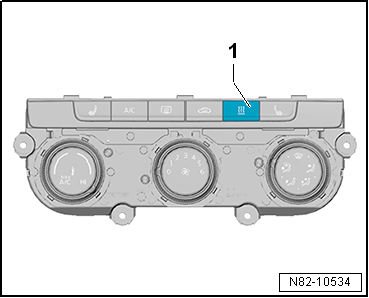
| Switching on auxiliary heater mode in vehicles with manual
air conditioning: |
| – |
Press instant heating button-1-. |
|
|
|
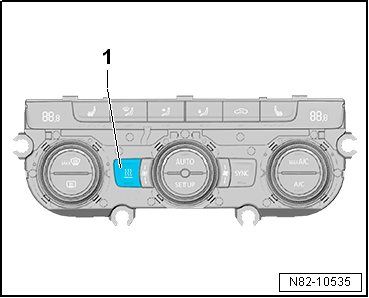
| Switching on auxiliary heater mode in vehicles with
Climatronic: |
| – |
Press instant heating button-1-. |
 Note Note
| Once the coolant temperature has reached approx. 82 °C, the
control unit switches to energy-saving control mode. If the
coolant temperature continues to rise above approx. 88 °C, the
control unit switches to the controlled waiting period. If the
coolant temperature does not drop below approx. 70 °C within
15 minutes during the controlled waiting period, the heater unit
will initiate the start procedure into the standard control mode
when the coolant temperature does drop below approx. 65 °C. |
|
|
|
Questions & answers
Auxiliary heater mode — Volkswagen Golf Mk7
How do I activate Golf Mk7 auxiliary heater mode manually?
Press the instant heating button (manual AC) or use the infotainment/remote control. The heater runs independently of the engine.
Once the coolant temperature has reached approx. 84 °C, the
control unit switches to energy-saving control mode. If the
coolant temperature continues to ri ...
If the button instant heat button has been pressed, or after
the preset operating time has expired or the coolant has reached
a temperature of 88° C, the combus ...


