| – |
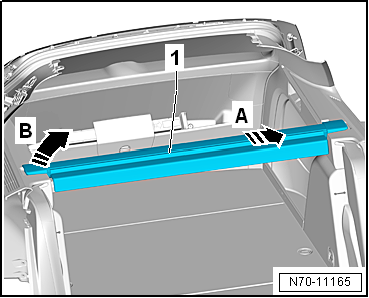
Open luggage compartment cover -1-
completely. |
| – |
Fold down rear seat backrests. |
| – |
Push luggage compartment cover -1-
in -direction of arrow A-. |
| – |
At the same time, lift luggage compartment cover
-1- upwards out of right luggage
compartment side trim -arrow B-. |
| – |
Pull luggage compartment cover -1-
out of left luggage compartment side trim, and remove it. |
| Installation is carried out in reverse order. |
|
|
|
Questions & answers
Removing and installing luggage compartment cover — Volkswagen Golf Mk7
How do I remove the Golf Mk7 luggage compartment cover?
Open fully, fold rear seats, push cover in the direction of the arrow, release from side mountings and lift out.
1 -
Rear lid
2 -
Bolt
Qty. 4
1.5 Nm
3 -
Lower rear lid trim
Removing and installing
→&nb ...
Special tools and workshop equipment
required
Removal lever -80 - 200
...


