| – |
Remove luggage compartment side trim
→ Chapter. |
| – |
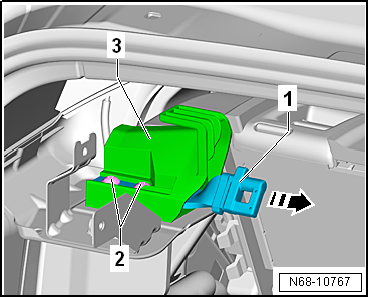
Pull belt webbing aside, and unscrew bolts
-2-. |
| – |
Pull bracket for net partition -1-
out of belt guide -3--arrow-, and
remove it. |
| Installation is carried out in reverse order. |
| |
→ Chapter „Assembly overview - rear outer three-point seat belt“ |
|
|
|
Questions & answers
Removing and installing bracket for net partition — Volkswagen Golf Mk7
How do I remove the Golf Mk7 net partition bracket?
Remove the luggage compartment side trim, pull the belt webbing aside, unbolt and pull the bracket out.
Removing
–
Remove net partition
→ Chapter.
–
Re ...
Special tools and workshop equipment
required
Removal wedge -3409-
...


