
Volkswagen Golf Mk7 Owners Manual: Locking and unlocking the vehicle from the outside
Fig. 27 and Fig. 28 (the alarm-button variant) show the Volkswagen Golf Mk7 key buttons used to lock and unlock the car from outside: a short press unlocks or locks normally, while pressing and holding triggers convenience opening or closing — windows and, where fitted, the sunroof — in one motion. This page lists the exact button-press behaviour for each function.
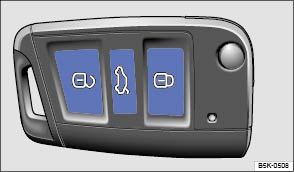
Fig. 27 Buttons on the vehicle key
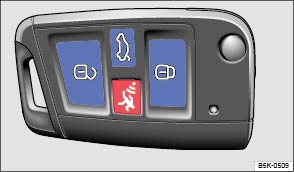
Fig. 28 Vehicle key with alarm button
 First read and observe the introductory information
and safety warnings
First read and observe the introductory information
and safety warnings | Function | Buttons to be used on the vehicle key or |
|---|---|
| Unlocking the vehicle. | Press the  button. Press and hold
for convenience opening. button. Press and hold
for convenience opening. |
| Locking the vehicle. | Press the  button. Press and
hold for convenience closing. In vehicles with a SAFELOCK mechanism, press
the button once to lock the vehicle
using the SAFELOCK mechanism. Press the
button twice to lock the vehicle without the SAFELOCK mechanism. button. Press and
hold for convenience closing. In vehicles with a SAFELOCK mechanism, press
the button once to lock the vehicle
using the SAFELOCK mechanism. Press the
button twice to lock the vehicle without the SAFELOCK mechanism.
|
| Unlocking the tailgate. | Press the  button . button . |
Please note: depending on the central locking function that
has been set in the infotainment system, all of the doors and the tailgate may only
be unlocked when the button is pressed twice .
The vehicle key will lock or unlock the vehicle only when the battery has enough power and the key is located within a few metres of the vehicle.
- When the vehicle is locked, all turn signals will flash once as confirmation.
- When the vehicle is unlocked, all turn signals will flash twice as confirmation.
If the turn signals do not flash as confirmation, at least one of the doors or the tailgate is not closed.
The vehicle cannot be locked using the vehicle key if the driver door is still open. The vehicle will lock again automatically within a few seconds of being unlocked if you do not open one of the doors or the tailgate. This function prevents the vehicle from remaining unlocked if the unlocking button is pressed by mistake.
Convenience opening and closing
- See electric windows – functions .
- See function of the electric panorama sliding/tilting roof .
Questions & answers
Locking and unlocking the vehicle from the outside — Volkswagen Golf Mk7

