
Volkswagen Golf Mk7 Owners Manual: Luggage net
Fig. 101 shows the luggage net fitted flat, and Fig. 102 the fastening rings and hooks used to secure it, in the Volkswagen Golf Mk7 boot. The net stops light items from sliding around during driving — this page explains how to fit it in either configuration.
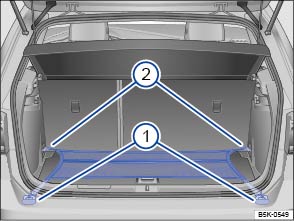
Fig. 101 In the luggage compartment: luggage net fitted flat
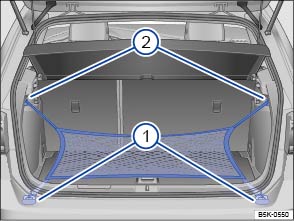
Fig. 102 In the luggage compartment: fastening rings ① and hooks ③ for fixing the luggage net
 First read and observe the introductory information
and safety warnings
First read and observe the introductory information
and safety warnings The luggage net stops light items of luggage from sliding around the luggage compartment. The luggage net also has a built-in pocket with a zip that can hold smaller items.
The luggage net can be attached in several different positions.
Hooking the luggage net flat on the luggage compartment floor
- Hook the luggage net onto the fastening rings . The luggage net zip must face upwards.
- Hook the luggage net onto the fastening rings .
Hooking the luggage net onto the loading edge
- Hook the luggage net onto the fastening rings . The luggage net zip must face upwards.
- Hook the loop onto the bag hook .
Removing the luggage net
The fitted luggage net is held under tension .
- Remove the hooks and loops of the luggage compartment net from the fastening rings or bag hooks.
- Store the luggage net in the luggage compartment.

 WARNING
- Always hold the luggage net hooks tightly to prevent them from falling out of the ring during installation or removal.
- Protect your eyes and face to avoid injuries from any hooks that may spring out during installation or removal.
- Always attach the luggage net hooks in the order described. If one of the hooks snaps back, the risk of injury increases.
Questions & answers
Luggage net — Volkswagen Golf Mk7

