
Volkswagen Golf Mk7 Owners Manual: Stowage compartment on the driver side
Fig. 109 shows the stowage compartment on the driver side of the Volkswagen Golf Mk7 dash. Press the button down and pull the grip to open, press the cover up until it engages to close — and a coin holder may sit inside the cover, useful for parking meters and toll booths, as this page explains.
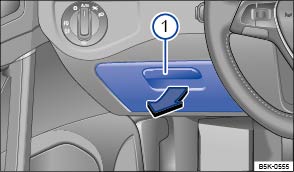
Fig. 109 On the driver side: stowage compartment
 First read and observe the introductory information
and safety warnings
First read and observe the introductory information
and safety warnings To open, press the button down and pull the grip in the direction of the arrow.
To close, press the cover upwards until it engages.

A coin holder may be located on the inside of the cover.
Questions & answers
Stowage compartment on the driver side — Volkswagen Golf Mk7
Where is the driver-side stowage compartment on the Golf Mk7?
On the left side of the dash panel. Press the button and pull the grip to open; push the cover upward to close.
Does the Golf Mk7 driver-side compartment have a coin holder?
Yes. A coin holder may be located on the inside of the compartment cover, convenient for parking meters and toll booths.
Is the Golf Mk7 driver-side stowage compartment large?
It is relatively small — designed for a wallet, coins or small documents. Larger items should go in the glove box or centre armrest compartment.

