
Note
| The removal and installation procedures may have to be modified
slightly depending on engine fitted. |
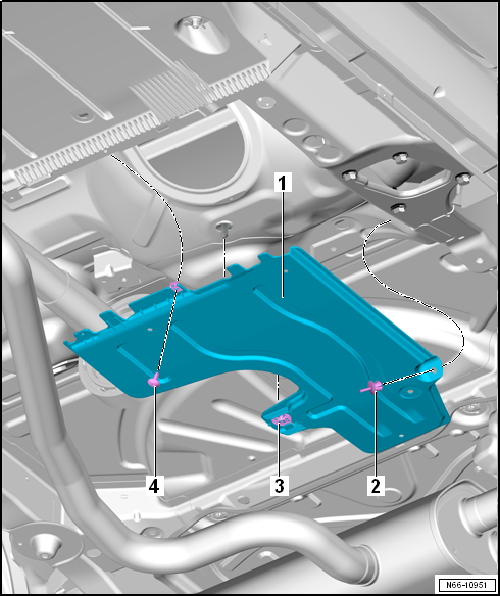
| – |
Loosen lock washer -3-. |
| – |
Unclip spreader rivet -2- and remove
bolt -4-. |
| – |
Remove rear underbody panel -1-. |
| Install in the reverse order of removal observing the following: |
Questions & answers
Removing and installing rear underbody cover – petrol/diesel — Volkswagen Golf Mk7
How do I remove the Golf Mk7 rear underbody cover?
Loosen the lock washer, unclip spreader rivets, remove bolts and lower the panel. Procedure varies by engine.
Removing
–
Remove bolts -2-.
–
Unscrew nuts -3-.
–
Remove underbody cover -1-.
Installing
...
Removing
–
Remove bolts -2-.
–
Unscrew nuts -3-.
–
Remove underbody cover -1-.
Installing
...


