| – |
Remove net partition
→ Chapter. |
| – |
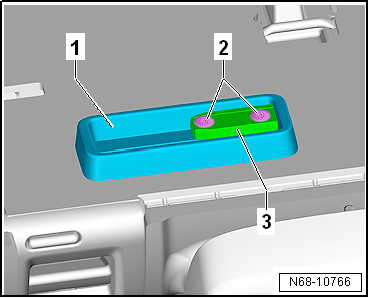
Remove insert -3- and mounting
-1- from right rear seat backrest
(2/3). |
|
|
|
| Install in reverse order, but note the following: |
 Note Note
| |
Note installation position of insert
-1- and mounting -2-. |
| |
Secure mounting -2- in left
threaded holes. |
| |
Fit locating lug on insert -1-
into recess in mounting -2-. |
| |
Clean remnants of locking fluid from thread with a wire
brush. Then, fit bolts using locking fluid (
→ Electronic Parts Catalogue ). |
| |
Also clean locking fluid from threaded holes (e.g. using
thread chaser). |
| |
→ Chapter „Assembly overview- net partition“ |
|
|
Questions & answers
Removing and installing net partition mounting — Volkswagen Golf Mk7
How do I remove the Golf Mk7 net partition mounting?
Remove the net, unbolt the insert and mounting from the rear seat backrest.
Removing
–
Fold down both rear seat backrests.
–
Pull net partition -1- towards
right out of mount ...
Removing
–
Remove luggage compartment side trim
→ Chapter.
–
Pull belt webbing aside, a ...


