
Volkswagen Golf Mk7 Owners Manual: Operating the cruise control system (CCS)
Fig. 161 shows the CCS switch and buttons beside the steering column, and Fig. 162 shows the equivalent controls on the multifunction steering wheel of the Volkswagen Golf Mk7. This page lists every switch position and button press needed to set, adjust, pause and cancel the cruise control.
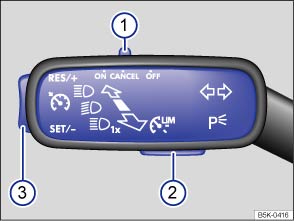
Fig. 161 On the left of the steering column: switch and buttons for operating the CCS
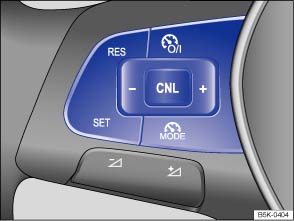
Fig. 162 Left-hand side of the multifunction steering wheel: buttons for operating the CCS
 First read and observe the introductory information
and safety warnings
First read and observe the introductory information
and safety warnings | Function | Switch position, switch operation on the turn signal lever or button on the multifunction steering wheel | Action |
|---|---|---|
| Switching on the CCS. | Move switch ① on the turn signal lever to position
  , or
press the , or
press the  button on the multifunction
steering wheel. button on the multifunction
steering wheel. |
The system is switched on. No speed has yet been stored and the speed is not yet being controlled. |
| Switching between the CCS and the speed limiter. | Press button ② on the turn signal lever, or press the
 button on the multifunction steering wheel. button on the multifunction steering wheel.
|
This switches between the CCS and the speed limiter . |
| Activating the CCS. | Press button ③ on the turn signal lever at the area
marked  
 
 , or press the
button on
the multifunction steering wheel. , or press the
button on
the multifunction steering wheel. |
The current speed is stored and controlled. |
| Switching off the CCS control temporarily. | Press switch ① on the turn signal lever into position
 
 , or
press the
button
on the multifunction steering wheel. , or
press the
button
on the multifunction steering wheel.OR: briefly press the button on the multifunction steering wheel.OR: depress the brake pedal. |
Control is switched off temporarily. The speed is stored in the memory. |
| Resuming CCS control. | Press button ③ on the turn signal lever at the area
marked 
 , or press the
button on the multifunction steering wheel. , or press the
button on the multifunction steering wheel.
|
The stored speed is reactivated and controlled. |
| Increasing the set speed (during CCS control). | Press button ③ in the area marked
, or briefly press the
button on the multifunction steering wheel
to increase the speed in small increments of 1 km/h (1 mph) and to store
the speed. |
The vehicle accelerates actively until it reaches the new set speed. |
| Press the button on the
multifunction steering wheel briefly to increase the speed in increments
of 10 km/h (5 mph) and to store the speed. |
||
| Press button ③ on the turn signal lever in the area
marked
, or press and
hold the button on the multifunction
steering wheel to increase the speed continuously until the button is released
and to store the speed. |
||
| Decreasing the set speed (during CCS control). | Press button ③ on the turn signal lever in the area
marked
, or briefly press the
button on the multifunction steering wheel
to reduce the speed in small increments of 1 km/h (1 mph) and to store the
speed. |
The system will decrease the speed until the new set speed is reached by easing off the accelerator without actively braking. |
| Press the button on the
multifunction steering wheel briefly to reduce the stored speed in
increments of 10 km/h (5 mph) and to store the speed. |
||
| Press button ③ on the turn signal lever in the area
marked
, or press and hold the
button on the multifunction steering wheel
to reduce the speed continuously until the button is released and to store
the speed. |
||
| Switch off the CCS. | Move switch ① to the
 position.
OR: when regulation is active, briefly press the button on the multifunction steering wheel
twice.OR: in any operating mode, press and hold the button on the multifunction steering wheel.
|
The system is switched off. The stored speed will be deleted. |
The mph figures given in brackets in the table relate exclusively to instrument clusters with mile readings.
Changing gear in CCS mode
The CCS reduces acceleration as soon as the clutch is depressed, and automatically continues to regulate the speed after a gear change.
Driving downhill with CCS
If the CCS cannot maintain the vehicle speed when driving downhill, brake the vehicle with the foot brake and shift down gear if necessary.
Automatic switch-off
The CCS control will be switched off automatically or switched off temporarily:
- If the system detects a fault that could impair the function of the CCS.
- If the vehicle speed is higher than the stored speed for an extended period with the accelerator pedal depressed.
- If regulation related to the driving dynamics is taking place, e.g. by TCS and ESC.
- If the airbag is triggered.
Questions & answers
Operating the cruise control system (CCS) — Volkswagen Golf Mk7

