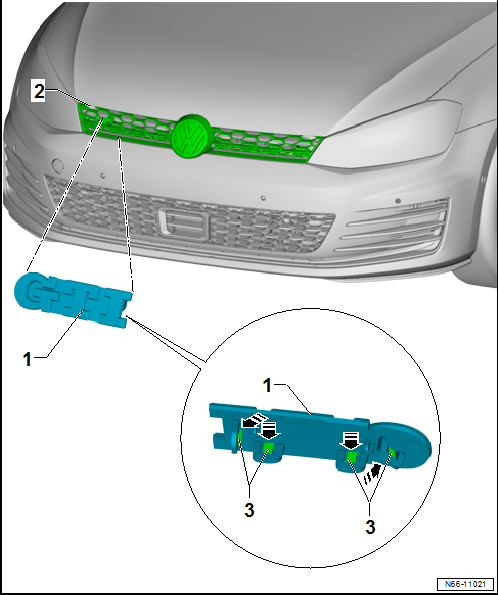
Using the GTI emblem as the reference example (applicable to all variants), this page covers removing the model designation badge from the Volkswagen Golf Mk7 radiator grille — release the rear retaining hooks with a screwdriver after removing the grille.
 Note Note
| The description applies for all emblems. Here the “GTI”
emblem is shown as an example. |
|
|
|
| – |
Removing radiator grille
→ Chapter |
| – |
Release retaining hooks at rear -3-
using a screwdriver -arrows-. |
| – |
Pull emblem with model designation -1-
off radiator grille -2-. |
| – |
Press emblem with model designation -1-
onto radiator grille -3- until retaining
hooks -3- engage audibly. |
Questions & answers
Removing and installing model designation on radiator grille — Volkswagen Golf Mk7
How do I remove the Golf Mk7 model badge from the radiator grille?
Remove the grille, release the retaining clips from behind, and push the emblem out. The procedure applies to all grille badges (GTI, GTD, R, etc.).
Note
The emblem cannot be removed without damage.
Removing
–
Use a screwdriver -3- to carefully
lever manufacturer emblem -1- out of
...
Special tools and workshop equipment
required
Torque wrench -V.A.G 1783-
...


