| Vehicles with diesel engine: |
| – |
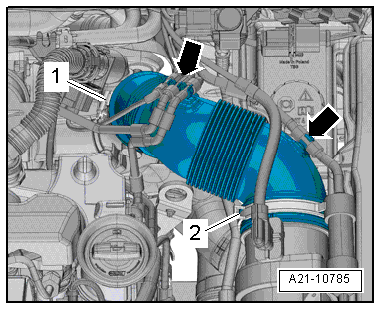
Remove air hose from air filter housing. |
|
|
|
| – |
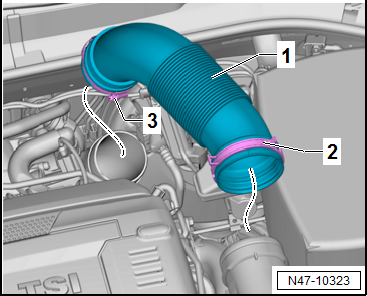
Open clamp -2- and screw-type
clip -3-. |
| – |
Remove air ducting hose -1-. |
|
|
|
| Continuation for all models: |
| – |
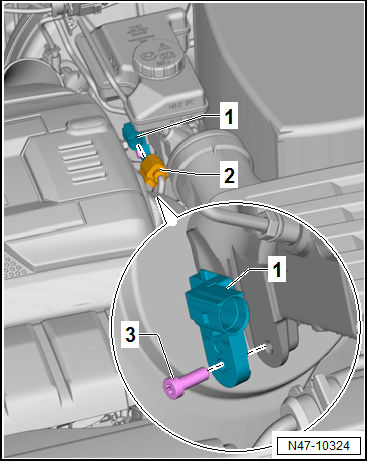
Disconnect connector -2- from
brake light switch -F--1-. |
| – |
Pull brake light switch -F--1-
at bottom off brake master cylinder. |
| Install in reverse order of removal, observing the
following: |
|
|
|
| – |
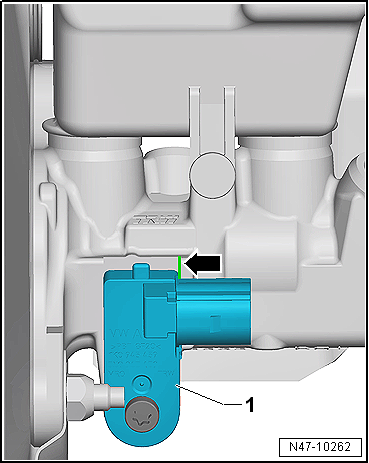
Ensure that brake light switch -F--1-
seats properly on edge -arrow- of
brake master cylinder. |
| → Chapter „Assembly overview - brake servo/brake master
cylinder, LHD vehicles“ |
|
|
|
Questions & answers
Removing and installing brake light switch, LHD vehicles — Volkswagen Golf Mk7
How do I remove the Golf Mk7 brake light switch (LHD)?
Turn the switch 90° anti-clockwise and pull it out of the mounting on the pedal bracket. Disconnect the connector.
Note
Only use new brake fluid conforming to VW standard (VW 501 14).
1 -
Cap
...
Removing
Vehicle with diesel engine:
–
Remove engine cover panel
→ ...


