
Volkswagen Golf Mk7 Owners Manual: Display and indicator lamps
Fig. 160 shows the CCS status display in the Volkswagen Golf Mk7 instrument cluster. This page explains each state: temporarily switched off (the stored speed shown smaller or darker), a system fault requiring a workshop visit, and active with the set speed displayed prominently.
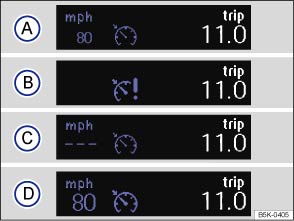
Fig. 160 Instrument cluster display: cruise control (CCS) status display
 First read and observe the introductory information
and safety warnings
First read and observe the introductory information
and safety warnings CCS displays
Status :
 CCS switched off temporarily. The stored
speed is shown in small numbers or displayed in a darker shade.
CCS switched off temporarily. The stored
speed is shown in small numbers or displayed in a darker shade.  System fault. Proceed to a qualified workshop.
 CCS switched on. Speed memory is empty.
 CCS is active. Stored speed in large
figures.
CCS is active. Stored speed in large
figures.
Indicator lamp
| Lit up | Possible cause |
|---|---|
 |
CCS or the speed limiter is controlling the speed. |
Several warning and indicator lamps will light up briefly as a functional check when the ignition is switched on. They will switch off after a few seconds.

 WARNING
- Never ignore any illuminated warning lamps or text messages.

 NOTICE

Questions & answers
Display and indicator lamps — Volkswagen Golf Mk7
What does the Golf Mk7 CCS status display show?
The instrument cluster shows the set speed, whether CCS is active or paused, and a system fault warning if applicable.
What does it mean when the Golf Mk7 CCS speed is shown in smaller numbers?
It means CCS is paused — the set speed is stored but the system is not actively maintaining it. Press RES to resume.
What should I do if the Golf Mk7 CCS shows a fault?
The system has detected a problem. CCS may be unavailable until the fault is resolved. Have the system checked at a Volkswagen dealer.

