Using radio release tool -T10057- and protective cap -VAS 6223/9-, this page covers removing information electronics control unit -J794- — select "Replace" via the diagnostic tester if renewing it.
| Special tools and workshop equipment
required |
|
|
|
| Radio release tool -T10057- |
|
|

|
| Protective cap for wiring harness connector -VAS 6223/9- |
| If the control unit is replaced, select the
Replace function of the respective
control unit in Guided fault finding
→ Vehicle diagnostic tester. |
| – |
Switch off ignition and all electrical consumers, and remove
ignition key. |
| – |
Open glove compartment. |
| – |
Eject any data medium that is still in control unit 1 for
information electronics -J794-. |
|
|

|
| – |
Insert 2 radio release tools -T10057- into slots in control
unit 1 for information electronics -J794--1-
until they engage. |
| The pointed projections on the grip rings point outwards. |
| – |
Grasp hold of grips on radio release tool -T10057- and pull
control unit 1 for information electronics -J794--1-
out of dash panel. |
| – |
Release and unplug connectors at control unit 1 for
information electronics -J794--1-. |
| Version with digital sound package control unit -J525- |
|
|

|
| – |
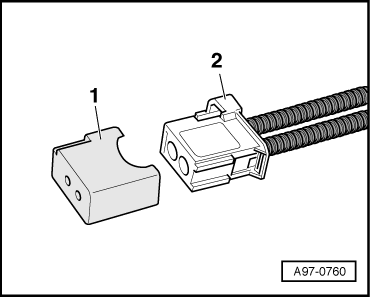
Push protective cap for cable connector -VAS 6223/9--1-
onto connector of MOST bus -2-. |
| – |
Press locking lugs on control unit 1 for information
electronics -J794- and pull out radio release tool -T10057-. |
| Install in the reverse order of removal. When doing this,
note the following: |
| – |
Slide control unit 1 for information electronics -J794- into
glove box until it engages. |
|
|
|
Questions & answers
Removing and installing control unit 1 for information electronics -J794- — Volkswagen Golf Mk7
How do I remove the Golf Mk7 infotainment control unit -J794-?
Remove the display. Unbolt -J794- from behind the dash panel. A new unit must be coded with the vehicle configuration.
Special tools and workshop equipment
required
Removal wedge -3409-
...


