
Volkswagen Golf Mk7 Owners Manual: Towing a trailer
Fig. 154 shows the ParkPilot screen display when the Volkswagen Golf Mk7 is towing a trailer with a factory-fitted towing bracket. With a trailer connected, only the front-scanned area appears on screen — this page explains why the rear sensors are disabled in this situation.
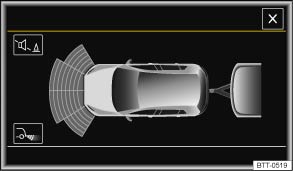
Fig. 154 ParkPilot screen display when towing a trailer (colour)
 First read and observe the introductory information
and safety warnings
First read and observe the introductory information
and safety warnings Only the scanned area to the front of the vehicle is shown on the infotainment system screen in vehicles with a factory-fitted towing bracket and a trailer with an electrical connection to the vehicle .
The distance values relating to the sides and rear of the vehicle are not displayed on the infotainment system screen, nor are they indicated by acoustic warning signals.
When towing a trailer, the segments are no longer displayed in relation to the steering input and the vehicle path display is hidden .
Questions & answers
Towing a trailer — Volkswagen Golf Mk7

