
Volkswagen Golf Mk7 Owners Manual: Luggage compartment cover
Fig. 96 shows removing and installing the Volkswagen Golf Mk7 luggage compartment cover. Once its supporting straps are attached, the cover raises and lowers automatically as you open or close the tailgate — this page explains that mechanism and how to remove the cover entirely when you need extra vertical space.
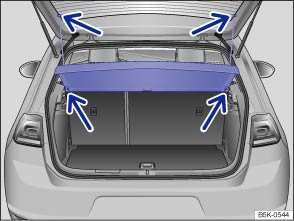
Fig. 96 In the luggage compartment: removing and installing the luggage compartment cover
 First read and observe the introductory information
and safety warnings
First read and observe the introductory information
and safety warnings When attached, the supporting straps will automatically raise or lower the luggage compartment cover when you open or close the tailgate.
Light items of clothing can be stowed on the luggage compartment cover. Please ensure that the view to the rear of the vehicle is not obstructed.
Removing the luggage compartment cover
- Unhook the supporting straps from the tailgate (upper arrows).
- Press the luggage compartment cover upwards out of the side retainers (lower arrows).
- If required, the luggage compartment cover can be stowed under the variable luggage compartment floor .
Fitting the luggage compartment cover
- Push the luggage compartment cover into the side retainers from above (lower arrows).
- Hook the supporting straps onto the tailgate (upper arrows).

 WARNING
- Do not stow any hard, heavy or sharp items either loose or in bags on the luggage compartment cover.
- Never transport pets on the luggage compartment cover.

 NOTICE
Questions & answers
Luggage compartment cover — Volkswagen Golf Mk7

