
Volkswagen Golf Mk7 Owners Manual: Lower section of the centre console
Fig. 8 (left-hand drive) and Fig. 9 (right-hand drive) label the lower centre console of the Volkswagen Golf Mk7: a stowage compartment housing the AUX-IN socket, USB socket or MEDIA-IN multimedia socket, and the gear lever — shown for both manual and automatic (DSG) gearboxes. Use this key to identify a socket or lever before reading the full radio, navigation or gear-changing sections.
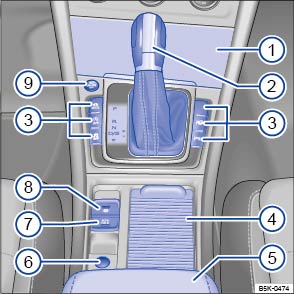
Fig. 8 Overview of the lower section of the centre console (left-hand drive vehicles)
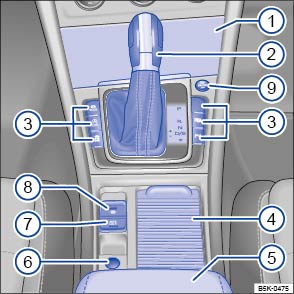
Fig. 9 Overview of the lower section of the centre console (right-hand drive vehicles)
Key for and :

Stowage compartment
- AUX-IN socket
 , USB socket
 or multimedia socket (MEDIA-IN) ⇒ BookletRadio,
or ⇒ Bookletnavigation system,
or multimedia socket (MEDIA-IN) ⇒ BookletRadio,
or ⇒ Bookletnavigation system,
- AUX-IN socket

Lever for:
- Manual gearbox
- Automatic gearbox

Button for:
- Driving Mode Selection


- Start/stop system

- Traction control system (TCS)
 or
or

- Park Assist system

- ParkPilot

- Driving Mode Selection
 Drink holder in the centre console
 Centre armrest at front with stowage compartment
 Cigarette lighter or 12-volt socket
 Auto Hold


 Electronic parking brake

 Button for starting and stopping the engine

 –
–


 –
–
 (Keyless Access locking and starting system)
Questions & answers
Lower section of the centre console — Volkswagen Golf Mk7
What is in the lower section of the Golf Mk7 centre console?
It contains a stowage compartment, the AUX-IN and USB or MEDIA-IN socket, the gear lever (manual) or selector lever (DSG automatic), buttons for Driving Mode Selection, Start/Stop, traction control (TCS), Park Assist and ParkPilot, a drink holder, the electronic parking brake switch and Auto Hold button, the 12V socket and the cigarette lighter.
Where is the USB or AUX socket in the Golf Mk7?
The AUX-IN, USB or MEDIA-IN socket is in the lower centre console stowage compartment, in front of the gear lever. The exact socket type depends on the specification and model year.
What buttons are around the gear lever on the Golf Mk7?
Depending on equipment, you may find buttons for the Start/Stop system, Driving Mode Selection, traction control (TCS/ESC), ParkPilot and Park Assist. Their positions are shown in the console overview diagram.
Where is the electronic parking brake switch on the Golf Mk7?
The EPB switch and the Auto Hold button sit behind the gear lever in the lower centre console. Pull the switch up to apply the parking brake; push it down while pressing the brake pedal to release.
Is the lower console different on manual and DSG Golf Mk7 models?
The overall layout is the same, but the manual gearbox has a traditional gear lever while the DSG has a selector lever with a different shift pattern. The surrounding buttons and stowage remain identical.

