
Volkswagen Golf Mk7 Owners Manual: Function
Fig. 127 shows the toll card reader in the front passenger stowage compartment of the Volkswagen Golf Mk7. This page gives the exact steps to use the ETC system: switch on the navigation system, insert a suitable ETC card, and watch for the device-readiness indicator before relying on it at a toll booth.
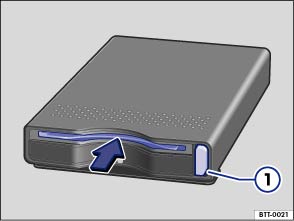
Fig. 127 In the stowage compartment on the front passenger side: toll card reader
 First read and observe the introductory information
and safety warnings
First read and observe the introductory information
and safety warnings Using the toll card system
Switch on the navigation system and insert a suitable ETC card in the toll card reader (arrow).
The device readiness will be confirmed with a long signal tone and displayed with the symbol ETC in the status bar of the navigation system.
Ejecting the toll card
To eject, press the toll card button .
Error message
If a short series of tones is heard when switching on the device, there is a fault, e.g. no ETC card, or the card is faulty. The toll card system cannot be used.
Questions & answers
Function — Volkswagen Golf Mk7

